


.svg)






 FileGrant
 RemoteGrant
 Connector
 AIGrant
 EmailGrant
 SecretGrant
Email isn't built to protect sensitive data. Here's what to do about it.
Companies send thousands of confidential documents through email every day. The protocol was built in the 1970s to deliver messages, not to protect them. GDPR, NIS2, and DORA require controls a standard inbox can't provide.
Standard email was designed to deliver messages, not to protect them. SMTP, TLS, and even PEC cover transit and proof of delivery, but none of them encrypt the content end-to-end, revoke access after the send, or log who opened what. To meet GDPR, NIS2, and DORA requirements for confidential documents, the protection has to sit on the document itself, not on the channel.
Is email safe for sending confidential business documents?
No. Standard email is a delivery channel: it doesn't provide post-send control, revocation, audit, or persistent document protection. For confidential data, you need data-centric protection (encryption, policy, tracking) or channels designed for confidentiality to meet GDPR, NIS2, and DORA requirements.
Email is a delivery protocol, not a security layer
Companies move thousands of confidential documents through email every day: contracts, financials, health records, source code, board materials. Email wasn't designed for any of it. The protocol behind it, SMTP, has been carrying corporate mail since 1982. It works exactly as intended: a digital postman that picks up a message from a client (Outlook, Gmail, Apple Mail) and hands it to the recipient's server.
That's the paradox. We use a 40-year-old delivery protocol to transport the most sensitive content in the company, then act surprised when something leaks. The reason we keep doing it is structural: email is wired into every workflow, and most teams underestimate the gap between "the channel is encrypted in transit" and "the data is protected."
What the data actually shows
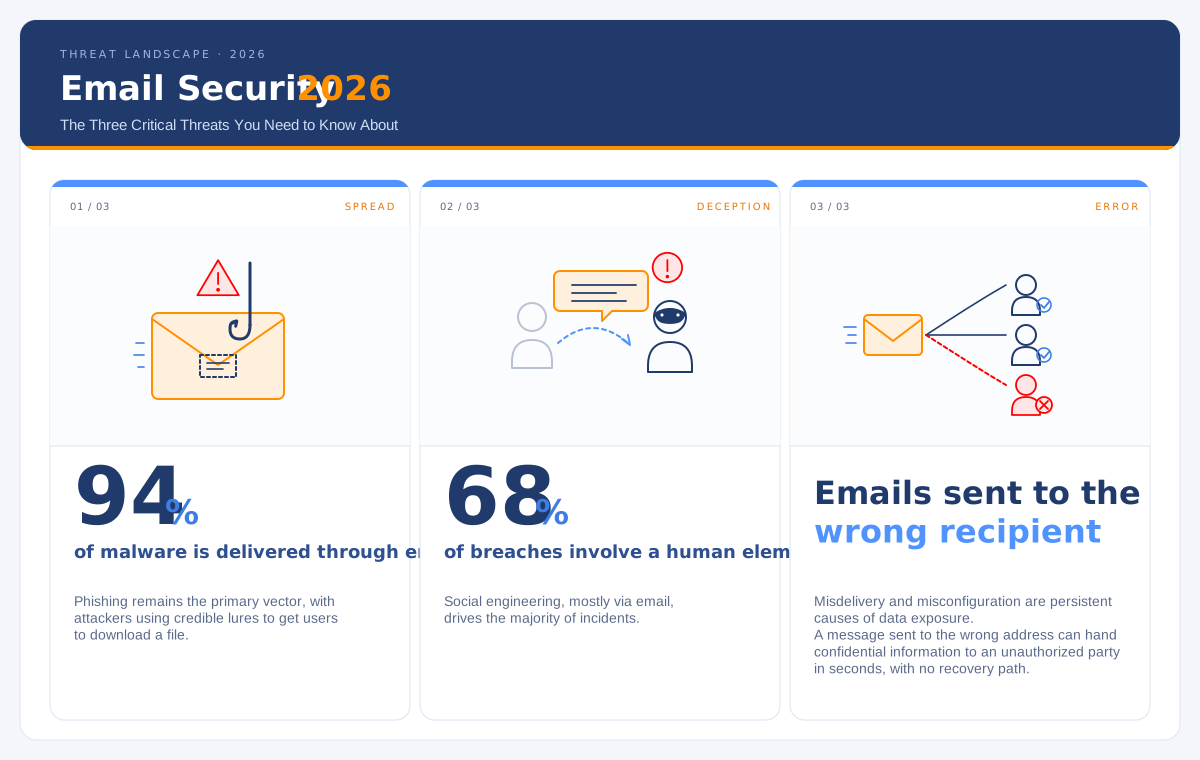
Verizon's 2025 Data Breach Investigations Report makes the size of the problem hard to ignore:
-
94% of malware is delivered through email. Phishing remains the primary vector, with attackers using credible lures to get users to download a file.
-
68% of breaches involve a human element. Social engineering, mostly via email, drives the majority of incidents.
-
Misdelivery and misconfiguration are persistent causes of data exposure. A message sent to the wrong address can hand confidential information to an unauthorized party in seconds, with no recovery path.
These aren't outlier years. The vector has been stable for a decade. The control surface around it has not kept up.
Why standard email fails as a protection layer
Email's weakness isn't a bug to patch. It's a set of design choices that no spam filter or password policy can fix:
No native encryption of the content. TLS protects the channel while the message is moving between servers. It does nothing for the message and its attachments once they land in a mailbox or get copied to backup. The content sits in plain form on every server it touches.
No revocation after send. Once you click send, you have no way to pull the message back. If it went to the wrong recipient, it's gone.
No real tracking. You don't know who opened the attachment, when, from which device, or whether they forwarded it. Read receipts are optional and trivial to bypass.
No expiration. An attachment sent five years ago is still openable, downloadable, and forwardable. Email has no native concept of document lifecycle.
"Human error" is usually a process error
When a confidential document leaves the perimeter via email, it's rarely an isolated mistake. It's the predictable outcome of a process where the unsafe path is also the easiest one.
If sharing a document securely requires an employee to open a separate platform, generate a password, send it through a second channel, and manually log who has access, the regular email window will win nine times out of ten. Security has to be the default path, not a parallel one. When the safest route is also the simplest, adoption follows.
AI-generated phishing has rewritten the threat model
Phishing used to be easy to spot. Typos, broken layouts, suspicious URLs, generic greetings: the visual signals were obvious enough that user training carried real weight as a defense.
AI-generated phishing has none of those tells. The text reads cleanly, the tone matches the supposed sender, and the personalization is sharper than what most internal communications achieve. Attackers pull OSINT from LinkedIn, corporate websites, press releases, and conference talks to build messages that reference real projects, real colleagues, and real deadlines. What used to take a skilled operator hours to craft now runs at scale: thousands of tailored phishing emails per hour, each one credible enough to slip past a trained eye.
The implication is structural. A defense that depends on users recognizing something "off" no longer works, because there's nothing off to recognize. The control has to move from the user's judgment to the document itself: if the attachment is encrypted, revocable, and access-logged, the phishing email becomes a much smaller problem when (not if) someone clicks.
What happens after you hit send
In standard email, once the message has been delivered, the recipient can forward it, save the attachment to an unmanaged device, archive it in a personal mailbox for years, or upload it to a third-party platform, without the sender ever knowing.
The mailbox itself becomes an ungoverned archive: outside the document management system, invisible to IT, with years of historical content sitting in one place. The moment that mailbox is compromised, every email in it is compromised with it.
The most common exposure points:
-
Auto-forwarding and external attachments. Forwarding corporate mail to personal Gmail addresses, or moving attachments through non-corporate cloud services, creates a direct data-leak path. Most organizations now block auto-forwarding to external domains and cap attachment size, but the underlying behavior (people working around restrictive limits) doesn't go away unless the secure path is genuinely easier.
-
Attachments saved to unmanaged devices (BYOD). Files saved on a personal laptop or phone fall outside corporate backup, DLP, and remote-wipe controls. VDI, MDM, and policy-based attachment handling reduce the exposure, but only when applied consistently.
-
Personal mailbox archives (Shadow IT). Employees archiving years of corporate email in personal accounts puts the company outside its own retention policy. After someone leaves, the company has no way to delete or recover that data, and no audit trail to prove compliance.
-
Sharing email content with third-party tools. Pasting email bodies or attachments into public generative AI tools or unapproved messaging apps moves confidential content into systems the company doesn't control. Training and policy help; system-level guardrails help more.
PEC certifies delivery. It does not protect confidentiality.
One source of confusion in the Italian and EU market is certified email (PEC). PEC is a legal proof-of-delivery system: it timestamps send and receipt in a way that holds up in court. It does not encrypt content, does not prevent forwarding, and does not track who opened the attachment.
For confidentiality, the content itself needs to be encrypted. Standards like S/MIME and PGP can encrypt both in transit and at rest, which gets closer to what GDPR, NIS2, and DORA actually require. Most enterprise deployments go a step further and treat encryption as a property of the document, not the message.
Retention is a compliance problem hiding in the inbox
Most companies define a single retention policy for the mailbox: keep everything for X months or years. That misses how GDPR actually works. GDPR doesn't reason by tool; it reasons by purpose of processing and category of data.
A signed contract may need ten years. A marketing communication, two. HR records follow employment-law rules. Health data follows its own framework. The mailbox doesn't separate any of this. It keeps every category in the same bucket, applies the same retention window, and trusts the user to know the difference.
The consequence is over-retention by default. More data sits in the inbox than any policy would prescribe, which means a bigger blast radius if the mailbox is breached, and a harder time demonstrating that retention is selective, lawful, and auditable. "We keep everything for five years" is not a compliant answer to a regulator asking why a 2019 marketing email is still in a 2024 dataset.
What it actually takes to close the gap
There's no single fix. The teams handling this well combine four controls:
-
Document-level end-to-end encryption. An encrypted channel isn't enough. The document has to be protected independently of how it travels, with keys the sending company controls.
-
Granular access tracking. Who opened the file, when, from which device, from which country. This is what audits ask for and what incident reconstruction depends on.
-
Revocation and expiration. The ability to cut off access to a file after it has been sent, and to set an automatic expiration date. The sender keeps control over time, not just at the moment of send.
-
Secure email that's also frictionless. Controls have to sit inside the existing workflow: the mail client, the approval flow, the file-sharing tool. If the secure path adds three steps that the regular path doesn't have, adoption drops and the old behavior comes back. Security has to be the path of least resistance.
The shift: from securing the channel to securing the document
Email is still the right tool for fast communication. It was never the right tool for protecting sensitive information, and patching it as if it were has run out of room.
The data-centric model is straightforward: protect the document with encryption and access policy, keep control after send, and govern retention by purpose, not by mailbox. Done this way, email stays useful as a channel and stops being the weakest link in the data protection chain.
EmailGrant: document control, before and after send
EmailGrant is the secure messaging system built into FileGrant. Your messages never leave the platform: they stay encrypted, tracked, and under your control. Revoke access to an email you've already sent. Set an expiration date. See exactly who opened what, when, and from where. Attachments inherit the same policies as your files. The protection sits on the document, not on the channel.